Headless architecture

Use Registry Stack behind the portal you already run.

Headless means Registry Stack has no screens of its own for this use. Your existing portal or staff application calls Registry Stack through documented interfaces (APIs). You choose the screens people use. Each Registry Stack product checks what the caller can see and do.

You can add or change an interface and keep the same register and the same access rules.

Interfaces around the products that hold the rules

Offer the service where people already work.

A portal or staff application can call the products it needs. You can also connect an approved assistant to a configured registry task. Each product checks access when it receives a request.

How an interface reaches the service

Experience

Your chosen interface

  • Your existing citizen portal
  • Your staff casework screens
  • An approved assistant

Interface

A documented channel

  • The public HTTP contract
  • A released language client
  • Configured MCP tools

Authority

The product that owns the result

  • Base Registry Engine owns the records
  • Registry Casework owns the decisions
  • Evidence Gateway owns the answers
A portal or staff application can use the APIs of the products it connects to. The assistant shown uses Model Context Protocol (MCP) to reach a configured Base Registry Engine task.
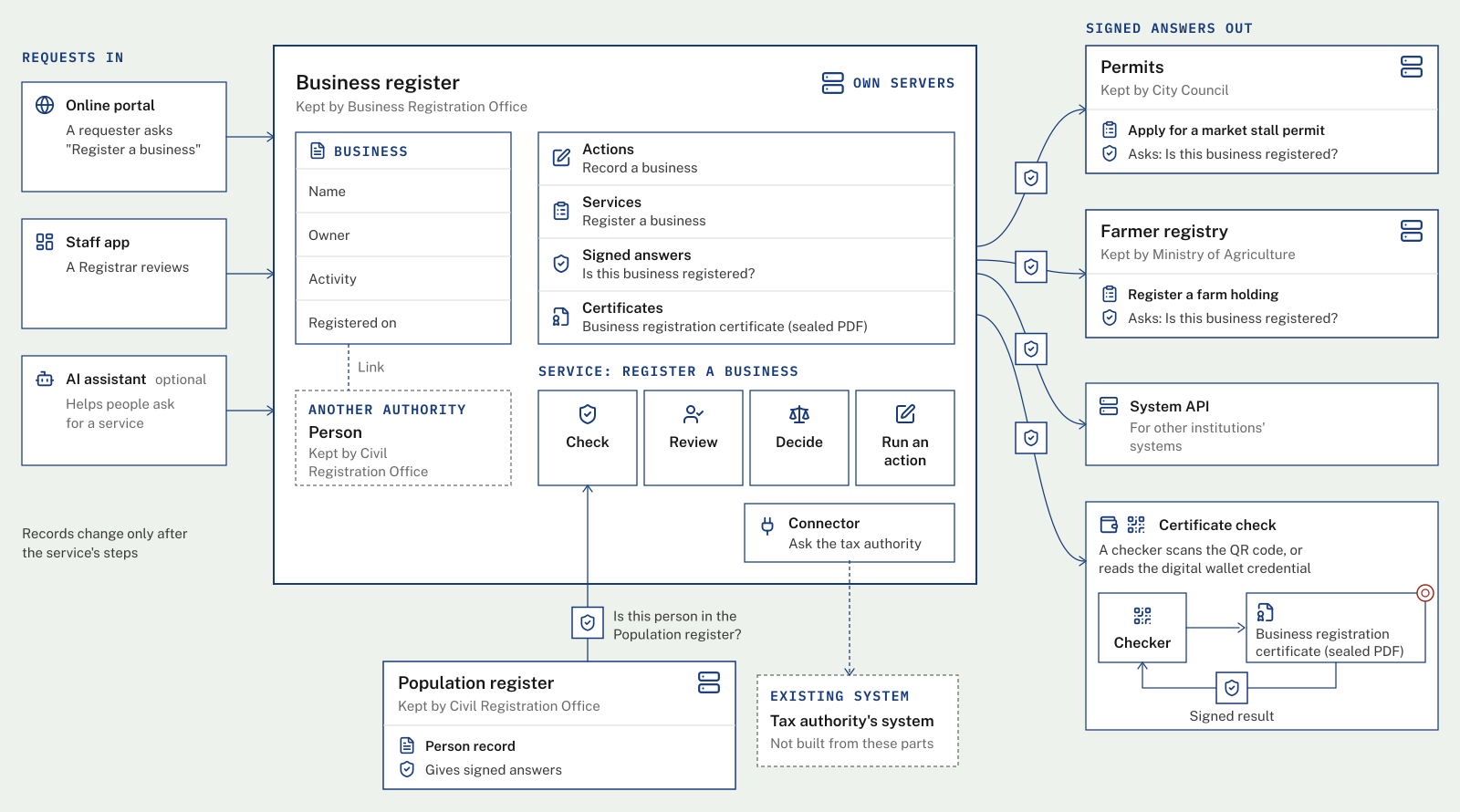
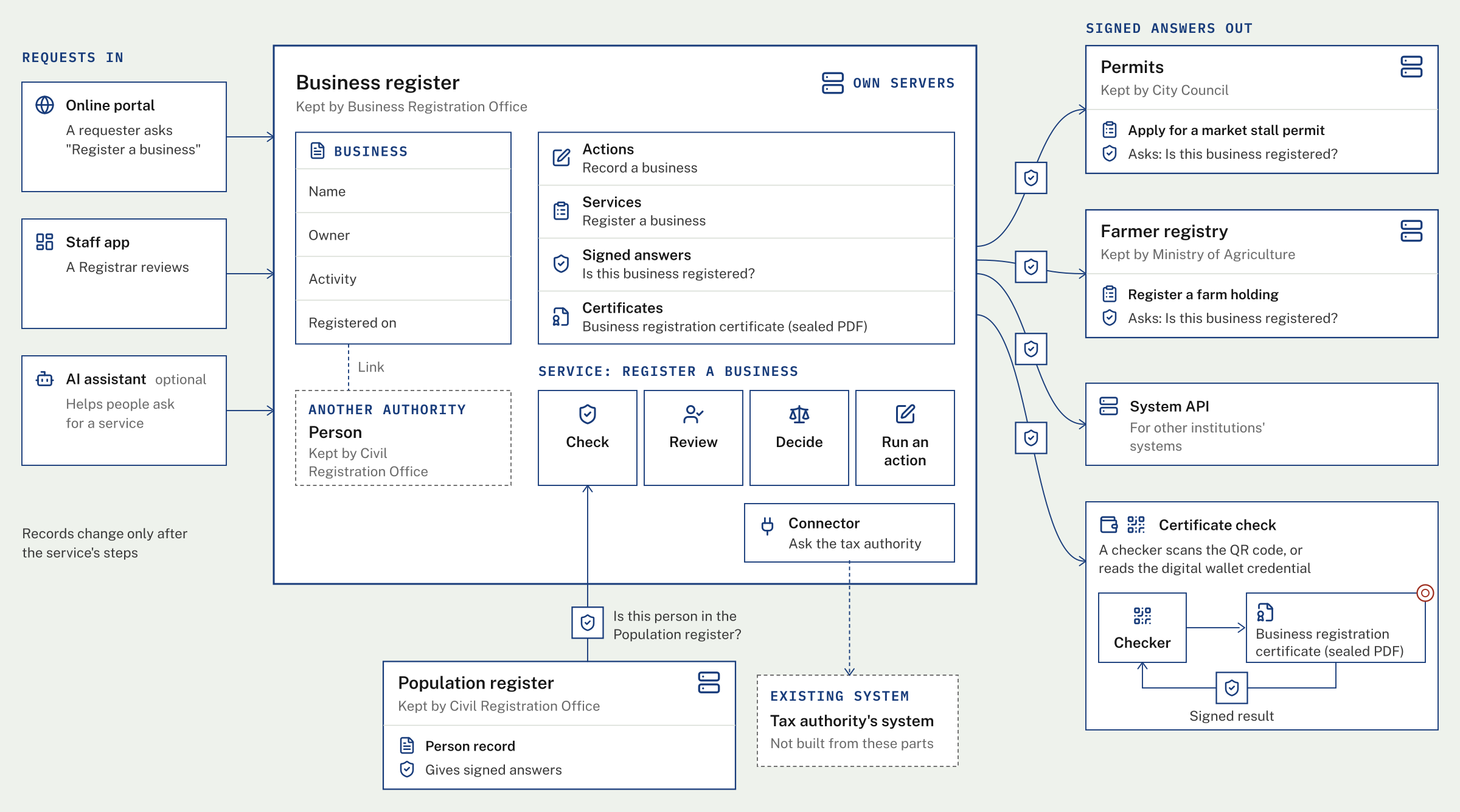
Requests come in to a Business register kept by the Business Registration Office on its own servers: from an online portal where a requester asks to register a business, a staff app where a registrar reviews, and an optional AI assistant that helps people ask for a service. The register keeps business records and runs the service steps check, review, decide and run an action. It asks the Population register of the Civil Registration Office for a signed answer, and reaches the tax authority’s existing system through a connector. Signed answers go out to a City Council permit service and a Ministry of Agriculture farmer registry, which each ask whether a business is registered, to other institutions’ systems through an API, and to a checker who scans the certificate’s QR code or reads a digital wallet credential.
A fictional business register: a portal, a staff app and an optional assistant send requests in. Other services and systems receive signed answers, never the record. Open the full-size picture.

Choosing the right contract

Match each interface to the task and to who is responsible.

Each channel has a different scope. Whichever channel you use, each product still checks what the caller is allowed to do.

Call the public product APIs

Your application can use the public product APIs. It can also use the released Node.js and Python clients, or the Rust client built from source. Your team manages sign-in. Your team also follows each request through its steps and handles failures.

Connect an approved assistant

Model Context Protocol (MCP) is an open standard. It connects an approved assistant to selected tasks. The released tools for citizens can read permitted details and prepare a draft. The person then submits the draft on your institution’s own site. The assistant does not submit it. These tools can do less than the HTTP APIs.

Registry Casework approval is not a register change

A Registry Casework approval records a review decision. Base Registry Engine still requires its own permission before an application can change a record. That permission is independent of the approval. This means a decision does not change the register by itself.

Public source code example

See how an application coordinates a record change.

In the Python example from release v0.46.0:

  • the application submits a proposal to Base Registry Engine
  • the application gives staff the commands to review the proposal in Registry Casework
  • a separately authorised caller applies the approved version
  • the application can also submit a notice through Registry Messaging, which asks a provider to send a message

The application tracks the steps and handles retries. Each product checks the credentials presented to it. Each product also applies its own rules.

Inspect the v0.46.0 Python reference application

Who builds the interface?

Your own team or a delivery partner can do this work, or we can do it for you. The work is to build or adapt the screens, connect sign-in and implement recovery when a request fails. Agree this work in the implementation scope.

For your technical team

Choose the smallest set of products and the interface your service needs.

Review the maintained adoption paths. Then define the user journey and the credentials in the implementation scope. Define the product boundaries and the recovery work there too.