Data spaces

Share data from the systems your institution already runs.

You can give approved partners access to selected records. Or you can give them a signed answer to a specific question. The answer is signed by your institution, which holds the data. The receiving service can check who issued it and whether it was altered. It does not show that the source information is true. Registry Stack can manage the source register or connect an existing system. It can also prepare the answer your institution agrees to share.

This page is for data providers, data users and the teams who connect them.

In a data space, organisations agree how they will share and use data.

A data space is a group of organisations that share data under shared rules and technical arrangements. The bodies that govern the space set the rules for joining, requesting and using data. Each data holder decides what it can offer under those rules. An organisation can provide data, use data from others or do both.

Start from a specific need

One participant needs to check a fact that another institution already holds. Agree which source can answer and who may ask. Also agree how much information the receiving service needs.

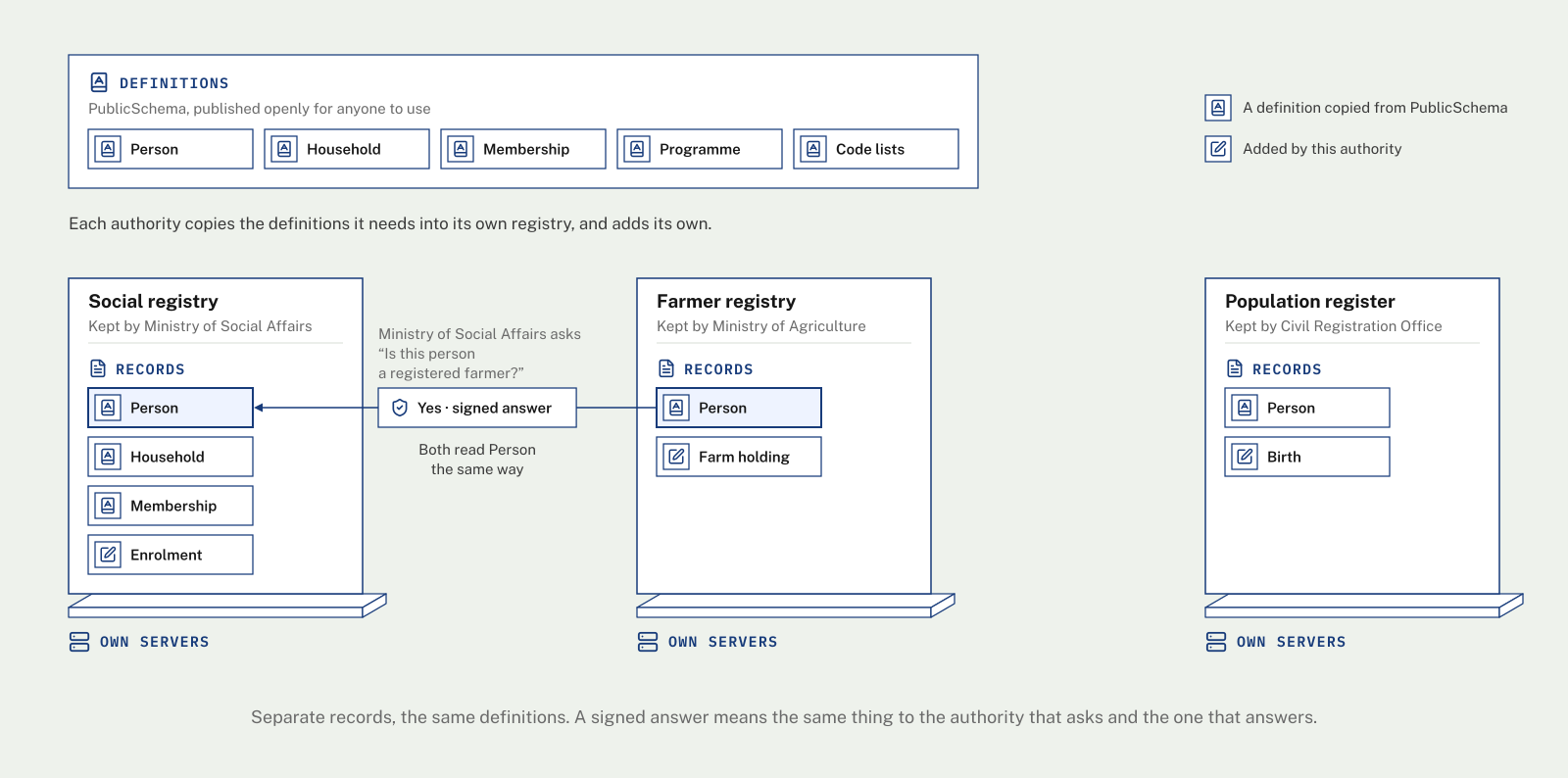
PublicSchema publishes definitions openly for anyone to use, such as Person, Household, Membership, Programme and code lists. Three registries, each on its own servers, copy the definitions they need and add their own: the Social registry of the Ministry of Social Affairs adds Enrolment, the Farmer registry of the Ministry of Agriculture adds Farm holding, and the Population register of the Civil Registration Office adds Birth. The Ministry of Social Affairs asks the Farmer registry whether a person is a registered farmer and receives a signed yes. Both registries read Person the same way.
Three fictional registries copy the definitions they need from PublicSchema. A signed answer about a person then means the same thing to the authority that asks and the one that answers. Open the full-size picture.

An illustrative exchange

Check a supplier’s licence without asking for the full file.

A licensing authority maintains the register. A public procurement service needs to check a supplier’s recorded licence status for an agreed purpose.

  1. Describe the offer

    The licensing authority describes the licence status check. It states which organisations can request it. It also describes the terms for using the answer.

  2. Answer an approved request

    The procurement service supplies the licence reference through the agreed exchange channel. Evidence Gateway is the product that answers a predefined question from an approved source. It checks the request and reads the approved source. Then it returns a signed status.

  3. Use the answer

    The procurement service can verify the signature. This shows who issued the answer and whether it was altered. It does not show that the source information is true. The procurement service can then apply its own rules. The licensing authority keeps the underlying file and controls access to the source.

See the released Evidence Gateway licence status example. It holds the configuration and synthetic cases. Then see the Base Registry Engine and Evidence Gateway example. It shows how a register can provide the source. Base Registry Engine is the product that maintains records.

What Registry Stack supplies

Choose what your institution needs to take part.

Maintain the source register

Base Registry Engine maintains records. It defines which operations and fields a caller may use. It keeps a history of changes. Your institution offers only the records and fields it has agreed to share.

Explore Base Registry Engine

Connect a system you already use

Registry Adapter exposes an agreed interface (API) over an existing system. It checks who can call each operation. It maps the request and returns the fields the project defines. The source system applies its own access rules and keeps its records. DHIS2 is an open-source health information system. The DHIS2 example shows different views over the same source.

Inspect how Adapter maps a DHIS2 source

Share an answer instead of a record

Evidence Gateway answers a predefined question using an approved source. The receiving service can verify who issued the answer and whether it was altered.

Explore Evidence Gateway

Describe what others can request

Registry Manifest produces portable descriptions of registers and the information they offer. Your implementation connects those descriptions to the catalogue the data space uses. Other participants can then find what your institution offers.

Explore Registry Manifest

Taking part and connecting

Connect your service to the exchange infrastructure of the data space.

The data space sets its own rules for:

  • membership
  • identity
  • agreements
  • use of data

Your integration team connects the participant’s API to the connector or exchange network that the data space requires. You agree how the provider will verify the caller’s identity. The provider’s service enforces its access rules on each request.

Start with one exchange

Bring one source, one partner and the data they need.

Tell us which system holds the data and who needs to use it. Tell us which rules and exchange infrastructure apply. Then agree what the receiving service may keep. Agree how to test an allowed request, a refused request and an unavailable source.