Local government

Run local permits and registrations from application to renewal.

Residents and businesses get a clear way to apply. Your staff get one place to review each request. The permit or registration record that results stays current. Registry Stack can connect to the payment, document and mapping systems you already use.

Service examples

Run the permits and registrations your authority delivers.

These services are illustrations. Your authority’s forms, decisions and rules for public information shape how each service is set up.

Market-trader permits

A trader submits the form and the evidence. They see what is missing and replace a document without starting again. Staff review the application, record the decision and issue the permit. Inspectors can check the current permit status without receiving the application file.

Explore licensing services
Food-premises registration

A business registers each premises. It updates the details when something changes. Staff review the submission and the inspection information. They correct duplicate entries and keep the establishment’s current status. Public and partner services see only the details your authority allows.

Explore establishment registers

Rented-housing registration

An owner submits a registration or reports a change. Staff check the information, decide the request and keep the property’s registration history. The service can keep using your existing property, payment and document systems. This means nobody copies that information by hand.

Explore property records
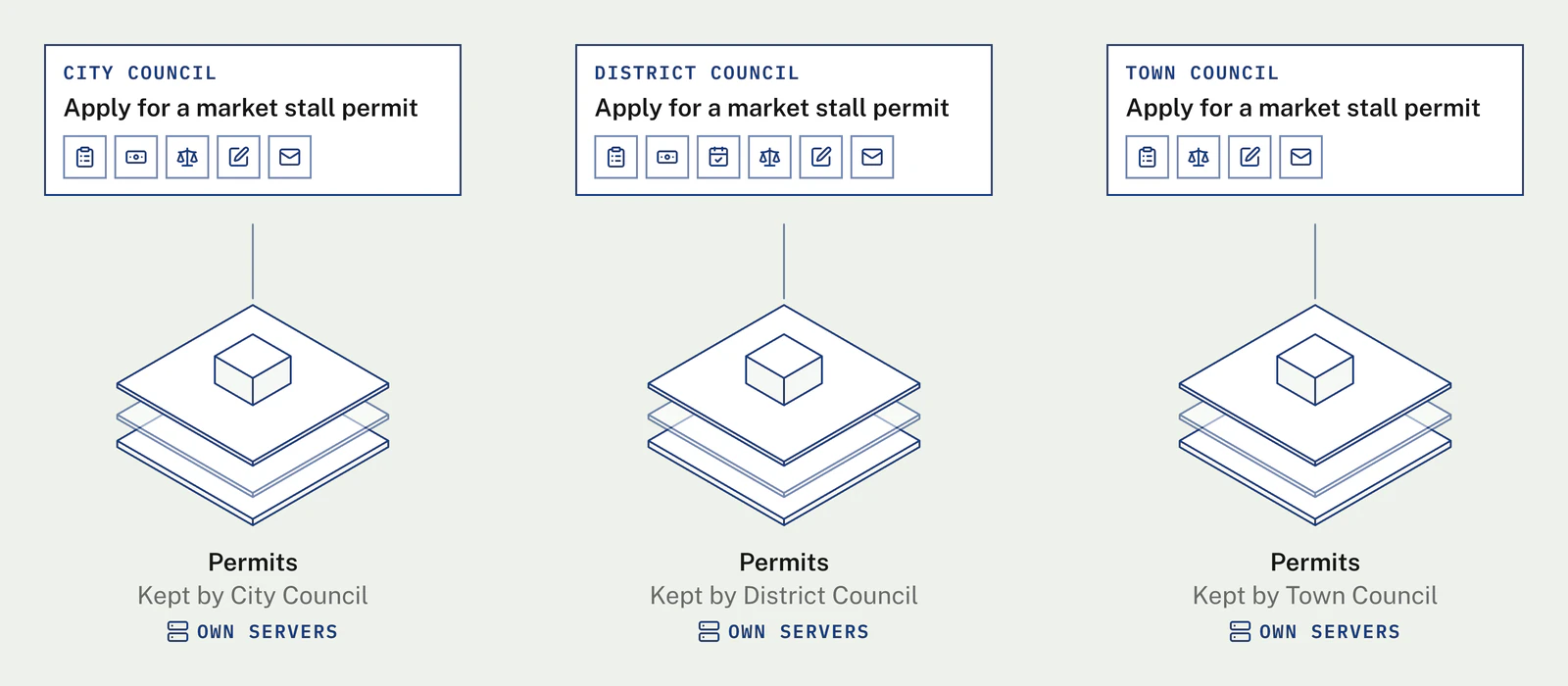
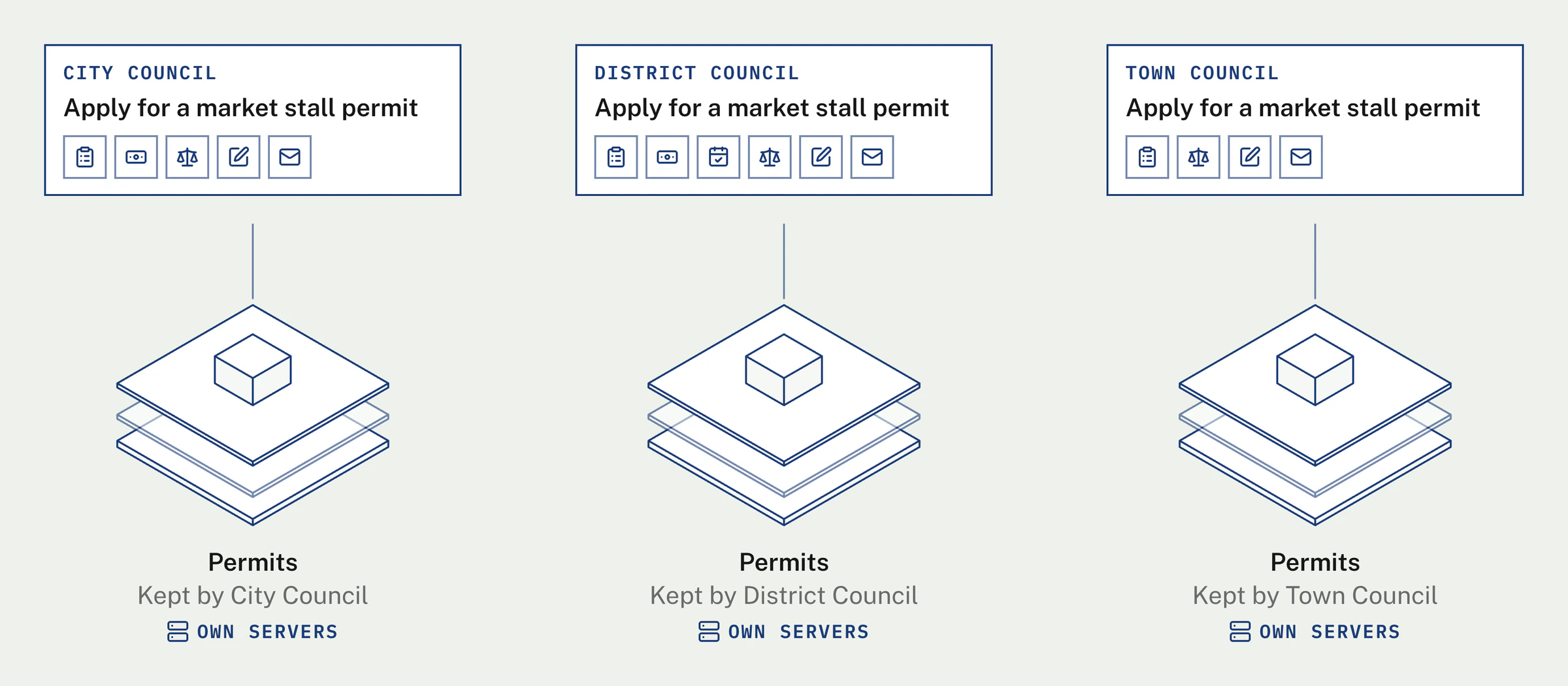
A City Council shares its market stall permit service as a template with a District Council and a Town Council. The District Council adds a site visit. The Town Council drops the fee. Each council runs its own installation on its own servers. Each council keeps its own permits.
One council shares its market stall permit service as a template. Every council adapts the service and keeps its own permits. The councils are fictional. Open the full-size picture.

From application to renewal

Receive applications, review them and update records.

The four steps below can support a permit, a premises registration or another local service. Each step can use your existing channels and systems where they already work well.

Apply and provide evidence
Applicants submit their details and supporting evidence. They can return to a saved draft. They can replace missing documents.
Review and decide
Staff receive the request in the right queue and check the evidence. If something is missing, they request changes. The applicant revises the request and submits it for a new review. Supervisors can see which officer is responsible for each active review. They can also see what needs attention.
Update the permit or registration
A staff member or a connected service with permission records the permit, registration or status after the decision. Authorised staff can still see earlier versions.
Notify, inspect and renew
The service can send an approved notice when the application system requests it. Inspectors can check permitted details. Staff can renew, suspend, correct or close a permit or registration.

Fits your existing systems

Keep the systems that still serve you well.

Your register can connect to the payment, identity, mapping, document and finance systems you already use. The implementation scope names what is added and what stays in place. It also names who operates each part.

Questions

Questions to ask when you choose your first service.

Do we need to choose a starting configuration first?

No. Tell us which service you need, who will use it and what it should do. We can identify a useful starting configuration. We can also explain how it would be adapted. You can request free access to the current configurations.

Browse the configuration marketplace

Do we have to replace our current applications?

No. Registry Stack can provide a new register. It can also connect selected capabilities to systems you already use. For example, a market-permit service could keep its existing payment system and document store. It could then add clearer review, permit history and status checks.

See integration patterns

Can the implementation include screens and hosting?

Yes. The written scope can include applicant, staff or public screens. It can also include identity, hosting, migration and integrations. We agree with you what your authority needs. We also agree how it will be tested before handover. If we host the service, hosting is priced separately in your proposal.

Which service should we discuss first?

You can bring a new permit or registration requirement. You can also bring a service where applicants and staff need a better way to work. Describe who will use it, the decisions your authority makes and any systems to connect.

Discuss one local service

Tell us about a service your authority needs.

Describe a market permit, a premises registration, a rented-housing registration or another local service. Include who applies, what staff decide and any systems to connect.

The core software is open source under the Apache-2.0 licence. Your own team or a provider you choose can inspect it, adapt it and run it. Or we can implement, host and run it for you, priced separately in your proposal.